Statement
The Statement page lists every change to your company's tokens and upload limit: what it was, who did it, and the balance after it. It covers the whole company, not only your own actions.
The page has two views: Movements and Upload receipts.
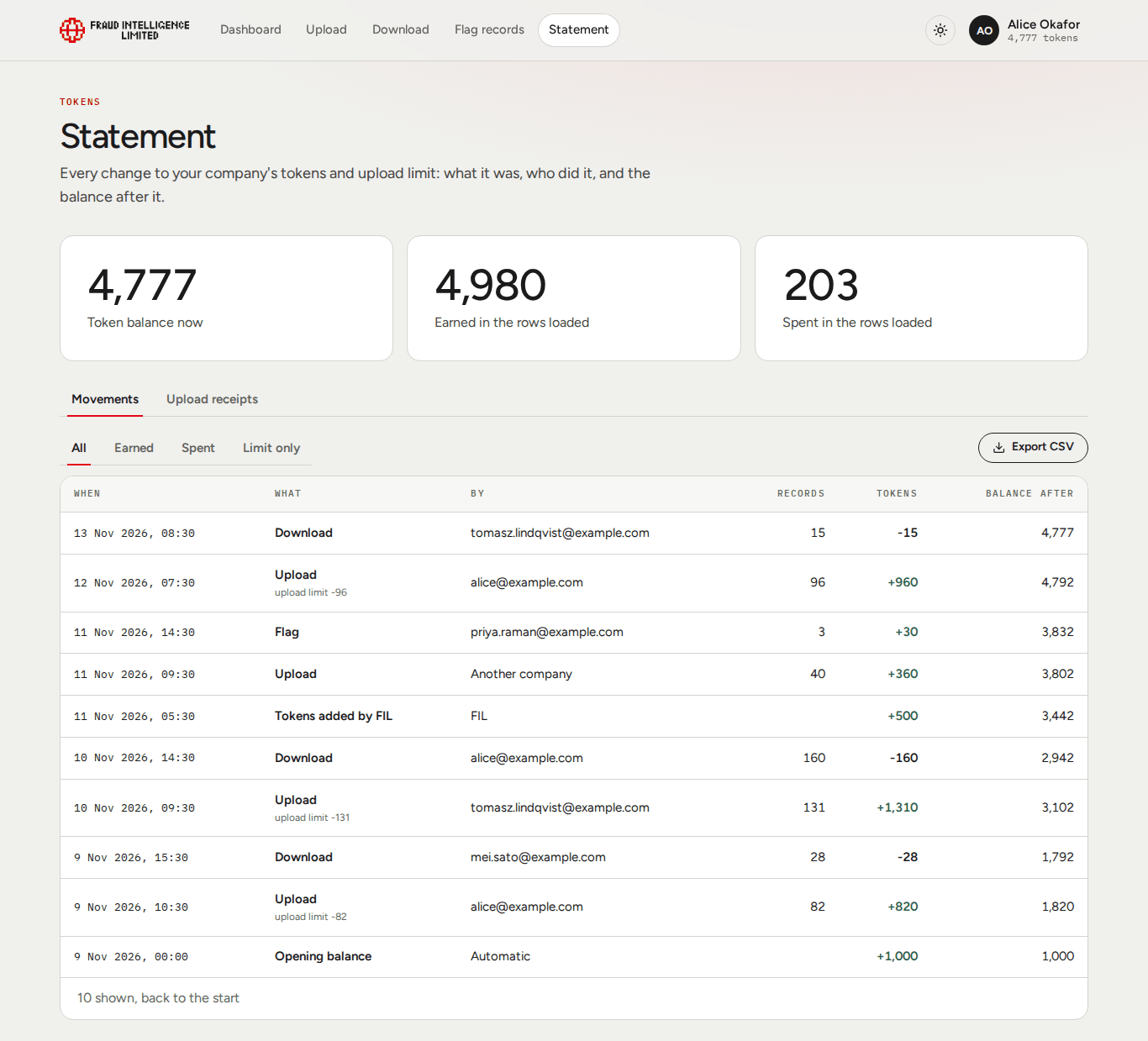
Summary
| Figure | Meaning |
|---|---|
| Token balance now | Your company's current balance. |
| Earned in the rows loaded | The sum of all positive token amounts in the movements loaded so far. The Opening balance row counts in this sum once it is loaded. |
| Spent in the rows loaded | The sum of all negative token amounts in the movements loaded so far. |
The page loads 50 rows at a time, latest first. Show older loads the next 50. The line below the table says how many rows are shown, and "back to the start" once there are no older ones. The two sums cover only what is loaded, so they grow as you load more.
Movements
| Column | Content |
|---|---|
| When | Date and time of the movement, in your local time. |
| What | The kind of movement. See the table below. If the movement also changed the upload limit, a second line shows it, for example "upload limit -120". |
| By | Who caused it. See the table below. |
| Records | The number of records the movement was about, for uploads, flags and downloads. Empty otherwise. |
| Tokens | The change to the balance, with a sign: + for tokens received, - for tokens spent, 0 for a movement that changed only the limit. |
| Balance after | Your company's token balance once the movement was applied. The top row shows the current balance. |
What
| Label | Meaning |
|---|---|
| Upload | Your company uploaded records. Tokens are the reward; the upload limit goes down by the number of records stored. Also shown when another company uploaded records that name your company as the source: you receive your share of the reward. |
| Flag | Your company flagged records. It shows 0 tokens when the records were your own company's or named it as the source, since those flags earn nothing. |
| Download | Your company bought records. Tokens are the cost. |
| Tokens added by FIL | Fraud Intelligence Limited added tokens to your balance. |
| Tokens removed by FIL | Fraud Intelligence Limited removed tokens from your balance. |
| Welcome bonus | The approval of your company's first user: the company received its upload limit and, once, the welcome bonus. |
| Opening balance | The balance your company had when the statement begins, on 9 November 2026. It is a starting point, not a movement. |
| Subscription | A charge for your company's plan. |
| Upload limit changed | Fraud Intelligence Limited set your company's upload limit. |
| Company removed | The company was removed from the Exchange. |
A movement without a label of its own is shown under its technical name. The return of the upload limit at the end of a period appears this way, as limit.reset, with the amount given back on the second line.
By
| Value | Meaning |
|---|---|
| An email address | The user of your company who did it. |
| FIL | An administrator of Fraud Intelligence Limited. |
| Automatic | A scheduled job of the Exchange, for example the return of the upload limit. |
| Another company | A user of another company. Seen on rewards that came with another company's upload. |
| A removed account | The account that did it has since been removed. |
The kind filter
| Filter | Shows |
|---|---|
| All | Every movement loaded. |
| Earned | Movements that added tokens. |
| Spent | Movements that took tokens. |
| Limit only | Movements that changed the upload limit and no tokens. |
The filter works on the rows already loaded. If it shows nothing, load older rows.
CSV export
Export CSV saves the movements currently shown, with the kind filter applied, as statement-<company ID>.csv. Load older rows first if you need a longer period.
| Column | Content |
|---|---|
| Entry | The entry number of the movement. Entry numbers only go up. |
| When (UTC) | Date and time in UTC. |
| What | The label, as on the page. |
| By | As on the page. |
| Records | Number of records, 0 if none. |
| Tokens | The signed change to the balance. |
| Upload limit | The signed change to the upload limit, 0 if none. |
| Balance after | The token balance after the movement. |
Text that starts with =, +, - or @ is written with a leading apostrophe, so a spreadsheet does not read it as a formula.
Upload receipts
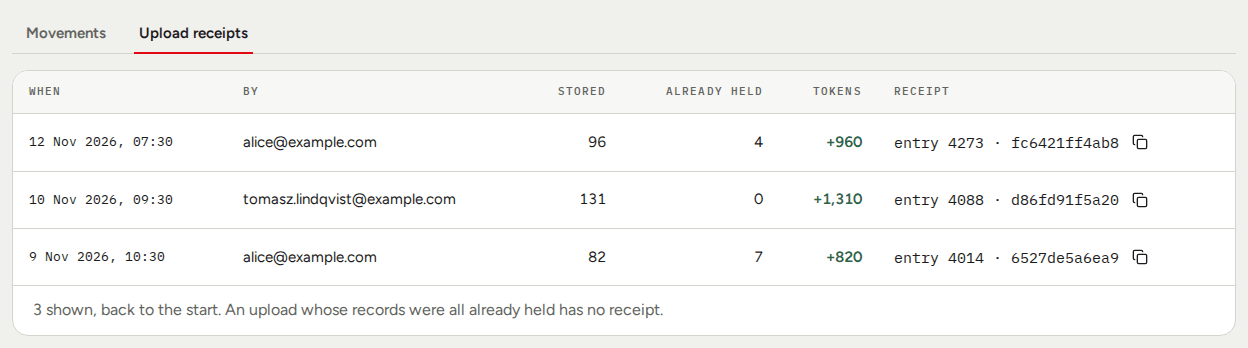
Every upload that stored at least one record has a receipt. An upload whose records were all already held has none. Receipts start on 9 November 2026.
| Column | Content |
|---|---|
| When | Date and time of the upload, in your local time. |
| By | The user of your company who uploaded. |
| Stored | Records the upload added to the Exchange. |
| Already held | Records of the upload that your company already held active. They were not stored or rewarded again. This count is kept for 30 days; for older uploads the column says "no longer kept". |
| Tokens | The reward your company received for the upload. |
| Receipt | The entry number and the first 12 characters of the entry's hash, as "entry 4273 · fc6421ff4ab8". The copy button copies the entry number and the full hash as number:hash. |
What a receipt is for
Every upload that stores records is written as one entry in the Exchange's tamper-evident ledger. A receipt points at that entry:
- The entry number is the place of the entry in the ledger. The same number is in the Entry column of the CSV export.
- The hash is the fingerprint of the entry. Entries are chained by their hashes, so an entry cannot be changed afterwards without the chain showing it.
Keep the copied receipt with your own records of the upload. It is your proof that the upload was applied, when, and with what result, and it identifies the exact entry if you need to refer to it later.
See Security and data.