Flagging records
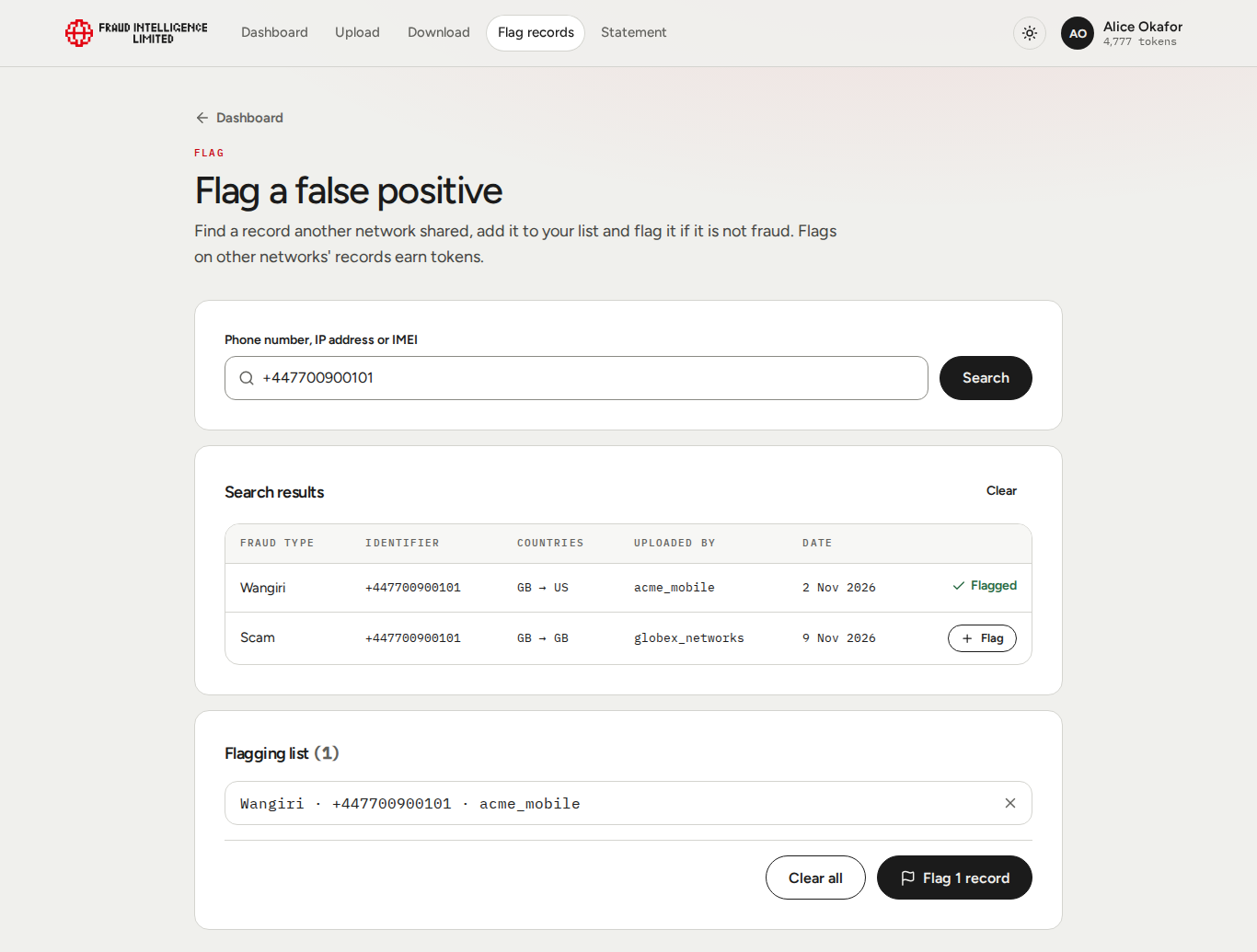
A flag tells the Exchange that a record is not fraud: a false positive. On the Flag records page, titled "Flag a false positive", you find the record by its identifier and flag it. A flagged record gets the status Flagged, and other members see that status, your company ID and the time of the flag when they download it.
Flagging
- Open Flag records in the menu.
- Enter the identifier in Phone number, IP address or IMEI and select Search.
- In Search results, select Flag on each record you want to flag. It is added to the Flagging list and the row shows "Flagged". Nothing is flagged until you confirm in step 6.
- Search again if you want to add records with other identifiers.
- Check the Flagging list. The number after the title is the number of records in it. The cross removes a record from the list, Clear all empties it.
- Select the flag button. It names the number of records, for example Flag 1 record.
The page then shows the result with Your reward in tokens.
Finding a record
- Enter the identifier as it was uploaded, for example
+447000123456or192.0.2.10. - You can search by phone number, IP address or IMEI. Records identified by a website or an email address cannot be found this way.
- The search is free.
- Only active records are shown. Expired records and records that are already flagged cannot be flagged and are not listed. If nothing matches, the page says "No active records match".
The results table has these columns:
| Column | Content |
|---|---|
| Fraud type | The fraud type of the record. |
| Identifier | The identifier, or the range as "first to last". |
| Countries | Origination and destination country codes. |
| Uploaded by | The company ID of the company that uploaded the record. |
| Date | The day the record was uploaded. |
What is rewarded
- Your company earns tokens for flagging a record that another company uploaded. The reward is 10 tokens per identifier. A range is rewarded for every identifier it covers.
- Flagging a record of your own company earns nothing. This covers records your company uploaded and records that name your company as the source. You can still flag them to mark them as false.
- A record is flagged once. After that it does not appear in the search and cannot be flagged or rewarded again.
- The Flagging list shows Estimated reward before you confirm. The result shows what was paid.
- The tokens go to your company's balance, which all its users share. The flag appears on the Statement as Flag.
If one record in the list cannot be flagged, for example because another member flagged it in the meantime, the whole request is refused and nothing is flagged. Search again and rebuild the list.
For the rules behind flagging, see Contributions and Tokens, rewards and limits.